
Property Customisations
A set of editor customisations designed to make commonly used data structures easier to read and edit, especially when nested or used in containers.
- Role: Programmer
- Discipline: Code (Editor)
- Engine: Unreal

Rogue Point relied heavily on a number of commonly used data structures. One example is FRandomRoll, which defines the chance for a given number of items to be selected.
These structures were often nested inside other structs or containers such as arrays and maps, giving designers fine-grained control over randomisation, but also making them increasingly difficult to read and work with.
As our level setups became more complex, understanding these values at a glance became a challenge. Important information was buried behind multiple layers of dropdowns and spread across several lines. To address this, I implemented a series of custom property layouts using Unreal’s property customisation system.
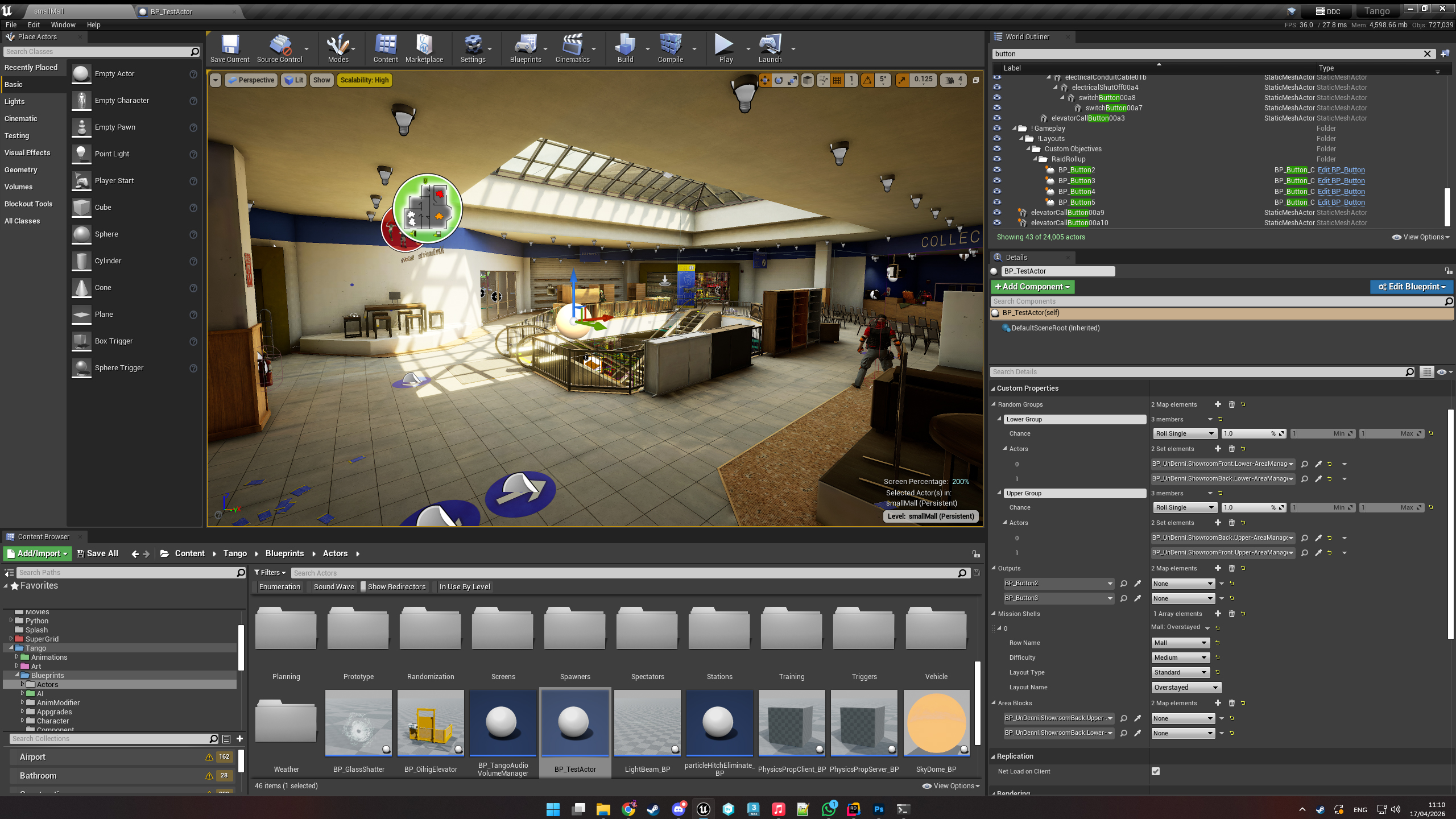
For example, I condensed the FRandomRoll struct into a single-line representation. This made it far easier to read and edit when used in nested structures or containers.
While a small change in isolation, improvements like this significantly reduced friction when working in the editor, especially across large, complex datasets like those used by the Randomization System.
Here is a function within the FRandomRoll struct customisation:
void FRandomRollStructCustomization::CustomizeHeader(TSharedRef<IPropertyHandle> StructPropertyHandle,
  FDetailWidgetRow& HeaderRow, IPropertyTypeCustomizationUtils& StructCustomizationUtils)
{
  // Get and set the handles for each individual struct property, basic setup
  TypePropertyHandle = StructPropertyHandle->GetChildHandle(GET_MEMBER_NAME_CHECKED(FRandomRoll, Type));
  ChancePropertyHandle = StructPropertyHandle->GetChildHandle(GET_MEMBER_NAME_CHECKED(FRandomRoll, Chance));
  MinPropertyHandle = StructPropertyHandle->GetChildHandle(GET_MEMBER_NAME_CHECKED(FRandomRoll, Min));
  MaxPropertyHandle = StructPropertyHandle->GetChildHandle(GET_MEMBER_NAME_CHECKED(FRandomRoll, Max));
  check(TypePropertyHandle.IsValid() && ChancePropertyHandle.IsValid() && MinPropertyHandle.IsValid() && MaxPropertyHandle.IsValid());

  // Create the box which all the properties will sit in
  TSharedPtr<SHorizontalBox> HorizontalBox;
  HeaderRow
    .NameContent()
    [
      StructPropertyHandle->CreatePropertyNameWidget()
    ]
    .ValueContent()
    .MinDesiredWidth(500.f)
    .MaxDesiredWidth(500.f)
    [
      SAssignNew(HorizontalBox, SHorizontalBox)
    ];

  // Type enum property, we bind to this later for some automatic changes
  HorizontalBox->AddSlot()
    .Padding(FMargin(PropertySpacing, 0.f))
    [
      SNew(SVerticalBox)
      + SVerticalBox::Slot()
      .AutoHeight()
      [
        TypePropertyHandle->CreatePropertyValueWidget()
      ]
    ];

  // Chance property
  HorizontalBox->AddSlot()
    .Padding(PropertySpacing, 0.f)
    [
      CreateOverlayPropertyWidget(ChancePropertyHandle, TEXT("%"), ChancePropertyWidget)
    ];

  // Min property
  HorizontalBox->AddSlot()
    .Padding(PropertySpacing, 0.f)
    [
      CreateOverlayPropertyWidget(MinPropertyHandle, TEXT("Min"), MinPropertyWidget)
    ];

  // Max property
  HorizontalBox->AddSlot()
    .Padding(PropertySpacing, 0.f)
    [
      CreateOverlayPropertyWidget(MaxPropertyHandle, TEXT("Max"), MaxPropertyWidget)
    ];

  // Bind delegate to handle changes in the enum value
  TypePropertyHandle->SetOnPropertyValueChanged(FSimpleDelegate::CreateSP(this, &FRandomRollStructCustomization::RollTypeValueChanged));
  RollTypeValueChanged();
}